Prepared with AI assistance for Genflow Editorial · Reviewed October 10, 2026 · Report a factual correction
Do not resize one “universal” product image and assume every marketplace received the same truth. A valid derivative needs a named master, a dated destination rule, a calculated crop window, protected product bounds, a preview of the real placement, and a release decision. If the product does not fit, block the crop and choose another source or create a separately reviewed canvas extension.
The Master-to-Channel Crop Contract below turns that decision into a record. It is useful for ecommerce operators, creative producers, catalog teams, and reviewers preparing AI-assisted or photographed product visuals. The contract is an editorial worksheet, not a Genflow feature, and the numeric example is fictional. No marketplace upload or image-generation test was conducted for this article.
Separate four facts that size guides often mix together
A destination can publish all of these at once:
- Hard requirement: a file below a pixel floor or with a forbidden overlay may be rejected.
- Recommendation: a larger square image may display or zoom better, without being the only accepted option.
- Display behavior: a theme, search card, or thumbnail may crop an accepted source.
- Creative requirement: the product, variant, color, quantity, and included accessories must remain accurate.
Record them separately. A recommended square size is not proof that a square crop is safe. An accepted upload is not proof that every thumbnail preserves the product. And a technically valid derivative is not acceptable when it changes what is being sold.
Platform rules also change. Google Merchant Center's dated 2026 update says its 500×500 minimum across product categories will be enforced on January 31, 2027, with warnings beginning in 2026. Google also recommends larger imagery for many placements. Shopify allows large product images but notes that actual display depends on the store theme and that consistent aspect ratios help side-by-side presentation. These are different kinds of statements; preserve the source URL and review date beside each one.
Freeze the approved master before making derivatives
The crop contract begins with a master record:
| Field | Example | Release rule |
|---|---|---|
| Master ID | SKU-ORBIT-BLACK / MASTER-03 | Never replace the pixels behind this ID |
| File identity | checksum plus repository path | Detect accidental overwrites |
| Canvas | 3000×3000 px | Arithmetic uses the actual decoded dimensions |
| Product bounds | x=20–80%, y=18–82% | Entire sold item must remain inside the crop |
| Protected details | cap, front label, left handle | Must remain legible and unoccluded |
| Variant truth | black / 500 ml / single unit | Derivative must depict this exact offer |
| Background authority | neutral studio background approved | A new generated extension needs separate review |
| Provenance/rights | source record and permitted destinations | Missing authority blocks release |
| AI metadata state | present / absent / not applicable | Preserve required provenance metadata |
Product bounds describe the smallest rectangle containing everything that must survive a crop. Add separate protected points for small but decisive features such as a clasp, logo, dosage, finish, or bundle component. Bounding only the dominant object can still remove a part that changes the offer.
For an AI-generated product image intended for Google Merchant Center, Google's current image_link specification says generative images must retain metadata indicating that they were AI-generated, including the relevant IPTC digital-source property. A resize/export step can strip metadata even when the pixels look correct. Treat metadata preservation as a separate release check.
Build the Master-to-Channel Crop Contract
Use one row per destination and placement. “Amazon” or “Shopify” is too broad when the same asset appears as a main image, gallery image, collection tile, theme crop, or ad placement.
| Contract field | What to record |
|---|---|
| Derivative ID | Stable ID tied to master and placement |
| Destination / placement | Platform, surface, locale, main/additional role |
| Rule type | Requirement, recommendation, or observed display behavior |
| Source evidence | Official URL, quoted field name, reviewed date |
| Output canvas | Pixel dimensions and aspect ratio |
| Crop window | Source-space left, top, right, bottom coordinates |
| Product coverage | Product bounds retained: yes/no |
| Protected-detail result | Each required detail visible: yes/no |
| Transformation | Crop only, resize, background extension, or new source |
| Metadata result | Color profile, transparency and AI/provenance metadata retained |
| Preview evidence | Screenshot/test ID for actual destination preview |
| Decision | Approved, blocked, or needs new asset |
| Reviewer / date | Person with product/channel authority |
Do not copy a current specification into a permanent preset without its date. The contract should make an old rule easy to identify and recheck.
Calculate whether the product fits before exporting
The fictional master is 3000×3000 pixels. Its protected product rectangle is:
- left:
20% × 3000 = 600 px - right:
80% × 3000 = 2400 px - top:
18% × 3000 = 540 px - bottom:
82% × 3000 = 2460 px
The product therefore occupies 1800×1920 pixels in the source. The following windows assume centered crops only to demonstrate the math; a production crop may move if every protected detail still fits.
| Target | Source-space crop window | Product fit | Decision |
|---|---|---|---|
| 1:1, 3000×3000 | x=0–3000, y=0–3000 | Full bounds retained | Eligible for resize and preview |
| 4:5, 2400×3000 | x=300–2700, y=0–3000 | x=600–2400 and full height retained | Eligible for preview |
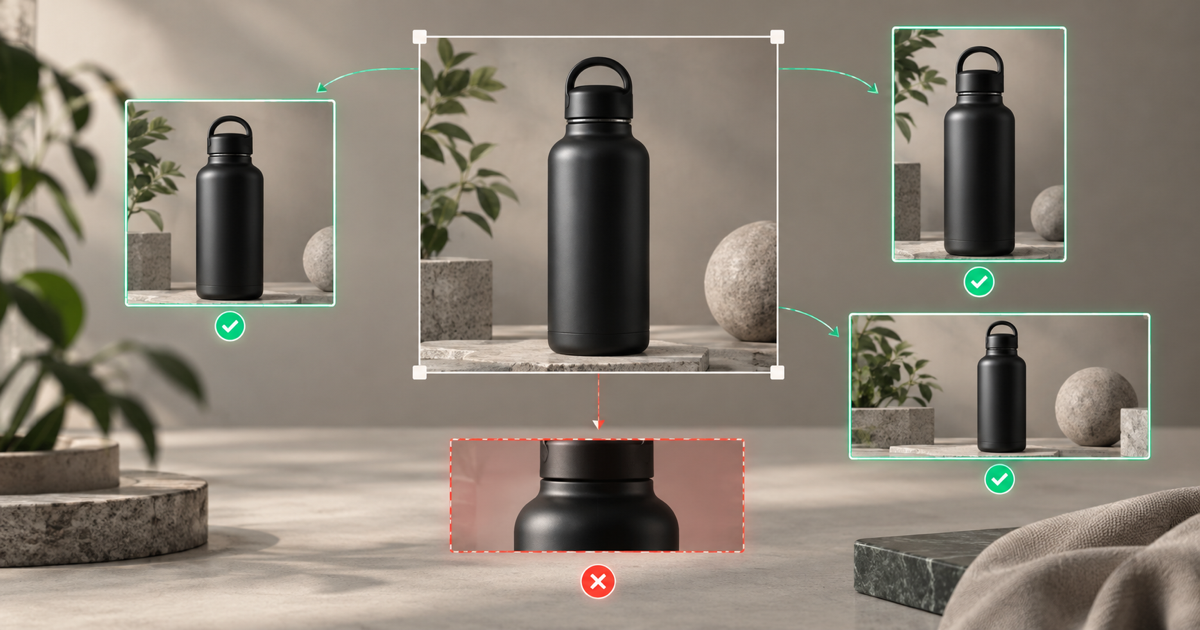
| 16:9, 3000×1688 | approximately x=0–3000, y=656–2344 | Product needs y=540–2460; top and bottom fail | Blocked |
The 16:9 derivative cannot be approved by “cropping a little tighter.” The calculation shows that the protected product bounds extend beyond both sides of the available vertical window. Valid routes are:
- choose another approved master with more vertical safe space;
- create a new composition from the product source;
- extend the background/canvas, preserve the unchanged product, and review the new pixels and metadata as a new master candidate;
- remove the placement from scope.
Do not stretch the product to make it fit. Do not generate missing product parts. Do not silently crop a handle, accessory, package edge, model limb, or quantity-defining item.
Measure fill without confusing it with crop safety
Some destinations care about how much of the frame the product occupies. Amazon's main-image guidance says the product should fill 85% of the image and remain fully inside the frame. Those conditions can pull in opposite directions for a tall, wide, or irregular item.
Record the method used to measure fill. A bounding-box width ratio, height ratio, or area ratio will produce different percentages. Use the destination's own documented interpretation where available; if it does not define the calculation, label your internal method as a team convention rather than an official platform rule.
A high fill value does not excuse an amputated product, and a safe crop does not automatically satisfy a fill target. Both checks belong in the contract.
Keep channel facts current
The following facts were reviewed on October 10, 2026. They are examples of evidence to attach to a contract, not a complete cross-platform specification table.
| Destination fact | Current source | How to use it |
|---|---|---|
| Google Merchant Center will enforce at least 500×500 across categories from January 31, 2027 | 2026 product data update | Treat the effective date as a scheduled rule, not a claim that every current image is already rejected |
| Google main images prohibit promotional overlays and require the item offered | image_link specification | Inspect the exact exported derivative and metadata |
| Shopify permits images up to 5000×5000/25 MP and says store display depends on theme | Shopify product media | Preview the installed theme/placement; do not infer one universal crop |
| eBay requires at least 500 px on the longest side and prohibits inaccurate or promotional images | eBay picture policy | Keep technical acceptance separate from product-truth review |
| Etsy thumbnails can appear in several shapes and its guidance recommends enough surrounding space for crops | Etsy image practices | Preview each relevant thumbnail rather than trusting the uploaded source alone |
When an official source and a third-party size guide disagree, use the official source for the rule and the live destination preview for observed behavior. Do not average conflicting numbers.
Route the asset before you crop it
The first decision is not ratio. It is image role.
- Main product image: exact sold item, variant and included quantity; stricter background/overlay rules often apply.
- Additional detail image: close-up that can intentionally omit other parts because its role is documented.
- Lifestyle image: contextual scene, but the product must still remain accurate.
- Collection/search thumbnail: a derivative whose focal point must survive automatic display crops.
- Campaign creative: may allow text or layout elements that would invalidate a marketplace main image.
Do not reuse a campaign image as a marketplace main image merely because its dimensions pass. Google and eBay both describe restrictions on added promotional elements for their product imagery. The contract's placement field prevents a file approved for one role from being promoted into another without review.
Use Genflow without transferring approval authority
Genflow's AI image generator workflow can help create and iterate product-visual candidates with reusable inputs. The ecommerce product visuals use case describes broader product-visual production. Keep the master identity, channel evidence, crop math, platform preview, product-accuracy decision, rights record, and final approval in the team's catalog or digital-asset system.
If the crop calculation fails, an image workflow may help create a wider-background candidate from an authorized source. That output is not automatically a derivative of the approved master: the new pixels may change shadows, labels, edges, scale cues, product finish, or accessories. Give it a new candidate ID and run the product background consistency system and catalog image release checklist before approval.
Never upload a product reference or customer asset unless your organization is authorized to use it in the selected workflow.
Preview the placement, not only the file
After export, inspect the actual file first:
- decoded dimensions and aspect ratio;
- product and protected-detail bounds;
- color/profile and transparency behavior;
- compression artifacts and edge halos;
- overlay, border, watermark and placeholder checks;
- provenance/AI metadata state;
- stable, crawlable image URL where required.
Then inspect the destination preview at the relevant viewport and placement. Shopify notes that themes determine presentation; Etsy exposes thumbnail adjustment because the primary image can appear in cropped views. A local 1:1 preview cannot prove that a collection tile, mobile search card, or responsive theme preserves the same framing.
Record the preview identifier and date. If the destination later changes its crop, reopen the affected derivative rather than rewriting the master record.
Release or block with one explicit reason
An approved row should answer:
Derivative
SKU-ORBIT-BLACK / ETSY-THUMB-04, made fromMASTER-03, retains the entire black 500 ml single-unit product and protected details in the tested square, portrait, and landscape thumbnail previews; the source rule was reviewed October 10, 2026; reviewer and evidence IDs are attached.
A blocked row should be equally precise:
The centered 16:9 crop removes protected vertical product bounds (
540–2460 pxrequired;656–2344 pxavailable). Do not release. Select an alternate master or create and review a canvas-extension candidate.
That decision is more durable than a folder named final-marketplace-images. It explains which image was approved, for which placement, under which evidence, and why another derivative was refused.
What this workflow contributes
The Master-to-Channel Crop Contract replaces a universal-size myth with a traceable production rule:
- preserve an immutable approved master;
- distinguish platform requirements, recommendations and observed display behavior;
- calculate product fit before export;
- block impossible crops instead of changing the item;
- preserve provenance and verify the real placement;
- date every volatile channel fact.
AI assisted source synthesis, arithmetic checking and drafting. The worked SKU, dimensions, coordinates and decisions are fictional. No marketplace accepted these example files, no product image was generated, and no conversion, search-ranking or return-rate result is claimed.
Sources reviewed
Turn this method into a reusable workflow
Start from one product asset, ad concept, or template and save repeatable production steps as a Genflow workflow.