Editorial owner: Genflow Editorial · report a factual correction
Research and product-source review completed: September 10, 2026
GPT Image 2.5 is designed to follow focused editing instructions and preserve subjects more reliably across multiple turns. Production teams should still treat every edit as a state change. Before each turn, record what may change, what should stay visually consistent, which regions must remain pixel-exact, and what evidence will make drift visible. Keep that record in an Edit Invariant Contract.
This article covers the newly released upstream gpt-image-2.5-flare and gpt-image-2.5-sunburst models. At the code revision reviewed here, Genflow exposes GPT Image 2, not the 2.5 identifiers. The method is ready for evaluation and future integration work; it is not a claim that GPT Image 2.5 is currently selectable in Genflow.
Why multi-turn editing needs state control
A conversational edit often sounds simple:
- Change the background to warm gray.
- Make the shadow softer.
- Add a small leaf beside the product.
- Localize the headline.
But each turn can affect more than its named target. Product proportions can drift, a label can be redrawn, crop geometry can shift, skin texture can change, a previous correction can disappear, or new text can appear. Better preservation lowers friction; it does not transfer approval responsibility to the model.
OpenAI's GPT Image 2.5 launch announcement says the model is better at changing only what was requested while keeping surrounding details stable, including across multiple turns. The official image prompting guide turns that claim into useful operating advice: identify the change and invariants separately, assign roles to references, refine one thing at a time, restate critical constraints, and inspect each result.
Build an Edit Invariant Contract
Create one contract for every accepted anchor image.
| Field | What to record |
|---|---|
| Anchor | Last accepted image ID, checksum or asset version, crop, and approval state |
| Turn objective | Exactly one requested change and why it is needed |
| Model and path | Model ID, Image API or Responses API, dated snapshot or alias, and request version |
| Request settings | Prompt version, size, quality, format, background, and relevant input IDs |
| Keep list | Each protected attribute labeled semantic/visual or pixel-exact |
| Change boundary | The object, region, property, or text allowed to change |
| Reference roles | Which image owns subject, product, style, garment, background, or layout truth |
| Enforcement path | Prompt plus review, Image API mask, or composite into the accepted anchor |
| Comparison method | Side-by-side, overlay, difference view, character check, or declared tolerance |
| Local check | Whether the requested edit is correct in the target region |
| Global regression check | Whether anything outside the boundary changed |
| Result | Accepted-output version/checksum, retry from the old anchor, escalate, or reject |
| Owner | Person authorized to approve the new state |
The contract is a Genflow Editorial worksheet, not a native feature of GPT Image 2.5 or Genflow. It does not guarantee pixel identity, legal clearance, factual accuracy, or successful generation.
Match the enforcement path to the invariant
Use three different controls; they are not interchangeable:
- Semantic or visual sameness: state the invariant in the prompt, then run local and whole-image inspection against the accepted anchor. This can test whether a face still looks like the approved person or a bottle still has the right silhouette. It cannot guarantee unchanged pixels.
- Bounded replacement: use an Image API mask when the model should regenerate only a declared region. The mask constrains the editable area, but the returned image still needs regression review.
- Pixel-exact protection: generate or edit the allowed region separately, then composite that result into the last accepted original. OpenAI's prompting guide explicitly recommends compositing when an untouched region must stay pixel-identical.
Label every contract field accordingly. A product's recognizable shape may be a semantic invariant; an approved logo, required copy layer, regulated mark, or already signed-off pixel area may be pixel-exact. If the enforcement path cannot meet the requirement, reject the edit before generation.
Use the Keep–Change–Check loop
Keep
List the semantic and visual invariants in observable language. “Keep the product the same” is too weak. A stronger review list might say:
- preserve bottle silhouette, shoulder radius, cap height, label boundary, embossed mark, and camera angle;
- keep the product centered at the same scale and vertical position;
- preserve the approved label region visually, with no new characters; if its pixels must remain exact, protect it through compositing;
- keep the front highlight and contact point unchanged;
- do not add accessories, logos, reflections, claims, or packaging.
For a person, identity controls may include face geometry, expression, age presentation, skin texture, hairline, body proportions, pose, and the specific permission record. For a layout, record the grid, hierarchy, copy, safe areas, chart values, and destination crop.
Change
Request one bounded mutation. Name both the target and the allowed property: “Change only the background color from pale blue to warm gray.” If the task is local, identify the region. If a reference supplies style or clothing rather than identity, state that role explicitly.
Do not combine “replace the room, change the pose, rewrite the headline, and make it more premium” into one approval step. When the output fails, that bundle makes it impossible to identify the cause or restore the last valid state.
Check
Run two reviews:
- Local edit check: Did the requested change happen, and only within its allowed boundary?
- Whole-image regression check: Did the product, person, copy, composition, background elements, and prior approvals survive?
Compare the candidate with the anchor, not with memory. Zoom into labels, hands, edges, texture transitions, shadows, small copy, and repeated patterns. Review at the final delivery crop as well as full resolution.
If it passes, assign a new accepted version. If it fails, return to the last accepted anchor rather than editing the drifted output again.
Assign every reference one job
The official prompting guide recommends naming input roles. A production record might use:
- Image 1 — edit target: owns crop, product scale, camera, and current approved state.
- Image 2 — product master: owns geometry, label, color, and included parts.
- Image 3 — background reference: supplies only palette and surface texture.
- Image 4 — style reference: supplies lighting treatment, not product design or copy.
When two references disagree, the prompt cannot repair the governance gap. Decide which source owns each attribute before the request. Run the source set through the reference asset preflight and remove obsolete or contradictory material.
Choose the editing path deliberately
OpenAI's image-generation guide documents two broad paths. The Image API supports direct generation and edits, including masked edits. The Responses API supports conversational, multi-step flows and can continue from prior image-generation state.
Use a direct edit when the operation is a controlled transformation with an explicit input and output record. Add a mask when the replacement region must be bounded. Use a conversational sequence when the creative decision genuinely benefits from progressive refinement. When untouched pixels must remain exact, composite the approved change into the accepted anchor instead of relying on either interface to preserve them. The interface does not change the approval rule: every accepted turn needs a versioned output and a reviewer.
For multi-turn work, do not rely only on “same as before.” Restate the few critical invariants. Conversation context can carry intent, but the contract carries accountability.
A hypothetical product-edit sequence
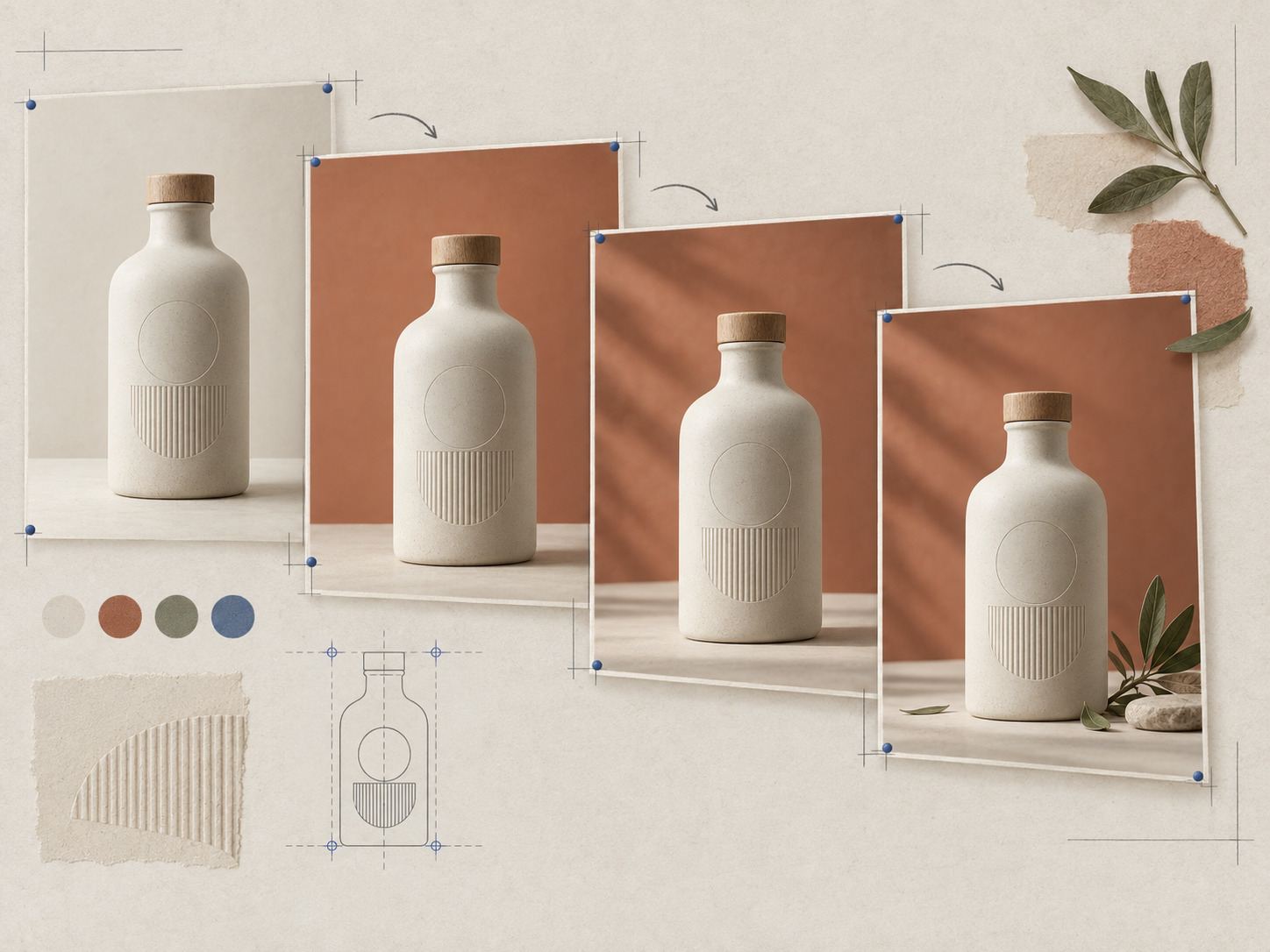
Suppose an ecommerce team has an approved ceramic bottle image, ANCHOR-BTL-07 v1. The bottle geometry, cap, embossed mark, front light, camera, crop, and label zone are recorded as protected attributes, each with its semantic or pixel-exact enforcement type. The example is fictional; no product or model output was tested for this article.
| Turn | Change boundary | Recorded invariants | Result |
|---|---|---|---|
| 1 | Background only: ivory → muted terracotta | Bottle, cap, mark, scale, camera, label zone, light | Accept as v2 only after local and global checks |
| 2 | Contact shadow only: softer edge | Everything in v2 except shadow softness | Reject if bottle appears lifted or base shape changes |
| 3 | Add one small olive branch on the surface, not touching product | Product and approved background/shadow state | Reject extra props, occlusion, reflection, or crop shift |
| 4 | Replace one approved text layer with supplied localized copy | Product image, layout, type position, all other text | Human language and overflow review required |
If turn 3 changes the cap or crop, restart from the accepted turn-2 anchor. Do not use the failed turn as the next input and ask the model to “fix the cap too.” That creates a longer chain with an uncertain source of truth.
A single filled contract row might read: anchor ANCHOR-BTL-07 v1 with checksum recorded; model candidate gpt-image-2.5-flare-2026-09-08 through the Image API; prompt PBG-04; 1536×1024, quality=medium, PNG; terracotta background as the only allowed mutation; bottle silhouette as a semantic invariant; label region as pixel-exact; background mask plus final label-region composite; overlay and character check against the anchor; result CANDIDATE-BTL-08 pending the named reviewer. These values are fictional and describe a planned record, not a GPT Image 2.5 or Genflow test.
Treat text as data, not decoration
For required copy, provide the exact text and specify how many times it may appear. Record the source language, target language, approved translation, line breaks, and no-extra-text rule. The prompting guide advises verifying labels and factual relationships in diagrams and checking for words left in the original language after localization.
Generated text still needs a character-level review. Product labels, prices, dates, legal qualifiers, measurements, and calls to action should come from an approved source. If the destination supports real HTML text or an editable design layer, use that when it reduces image-level correction risk.
Transparency is an output property
When the requested result needs transparency, specify it in both the prompt and API setting, use an alpha-capable format, and inspect the actual alpha channel. OpenAI's prompting guide warns that a drawn checkerboard is not transparency and advises repeating the transparency requirement across later edits.
Check hair, glass, smoke, soft fabric, reflections, and product edges against both light and dark test backgrounds. A clean-looking preview can still contain a solid matte or contaminated fringe.
Product truth and ad meaning can drift together
An edit may preserve the object yet change the ad's meaning. A new background can imply a location, season, material, audience, or use condition. A prop can imply included accessories. A shadow can make a product look suspended or larger. A before/after sequence can create a performance claim.
The FTC advertising FAQ explains that the overall impression matters and that objective claims need a reasonable basis. Requirements differ by market and product category. Route legal questions to the responsible owner, and reject a visual implication that the source evidence cannot support.
Use the catalog image release checklist after the edit sequence. The Edit Invariant Contract controls the state between turns; the release checklist decides whether the final asset is ready to publish.
Rights, safety, and provenance are separate gates
OpenAI's system card notes that higher realism can increase deepfake risk and describes safety checks at prompt, input-image, and output stages. A safety pass is not proof that a likeness is authorized or a commercial use is cleared.
The OpenAI service terms restrict certain uses of visual capabilities and require appropriate rights for likenesses. Keep the consent, license, territory, term, and revocation record with the source asset.
OpenAI also describes C2PA metadata and invisible watermarking for Images 2.5. The C2PA conformance program supports interoperable provenance, but provenance cannot decide whether a product label is correct, a person consented, or an advertising claim is supported. Preserve the editorial approval record even when credentials survive.
Accessibility belongs in the destination review
An image's purpose determines its text alternative. The W3C image tutorial distinguishes informative, decorative, functional, and complex images. Record whether the edited asset communicates information, performs an action, or is decorative, then supply destination-appropriate alternative text outside the pixels where possible.
Do not assume more visual detail makes an asset more accessible. Preserve contrast, avoid essential information that appears only as tiny generated text, and verify the published component with assistive-technology expectations in mind.
How this relates to Genflow today
Genflow's current GPT Image 2 model guide covers the model and product settings that are actually exposed. The source revision reviewed here does not expose gpt-image-2.5-flare or gpt-image-2.5-sunburst.
The Keep–Change–Check method is model-agnostic. Teams can use the contract now around Genflow's currently available GPT Image 2 workflow, then revalidate the active controls if GPT Image 2.5 becomes available in Studio. Never copy upstream parameter assumptions into a Genflow workflow without checking the product surface.
Research and preparation notes
Genflow Editorial reviewed ten primary and authoritative sources: OpenAI's release, prompting and image-generation guides, both model pages, system card and service terms, plus C2PA, FTC, W3C, and first-party Genflow source. Automated tools helped structure the evidence, draft the article, check overlap, and create the conceptual cover.
No GPT Image 2.5 output, customer image, product asset, audience response, time saving, acceptance rate, or conversion result was generated or tested for this article. The cover is an original visual metaphor for versioned editing, not a real product, interface, customer asset, or model comparison.
Every accepted edit becomes the next source of truth
Multi-turn editing is useful because each instruction can build on the last. That same property makes uncontrolled drift cumulative. Record observable invariants, choose an enforcement path, request one bounded change, run a local and whole-image check, and accept a new anchor only when both pass. When the chain breaks, return to the last approved image—not to the last image the model happened to produce.
Turn this method into a reusable workflow
Start from one product asset, ad concept, or template and save repeatable production steps as a Genflow workflow.