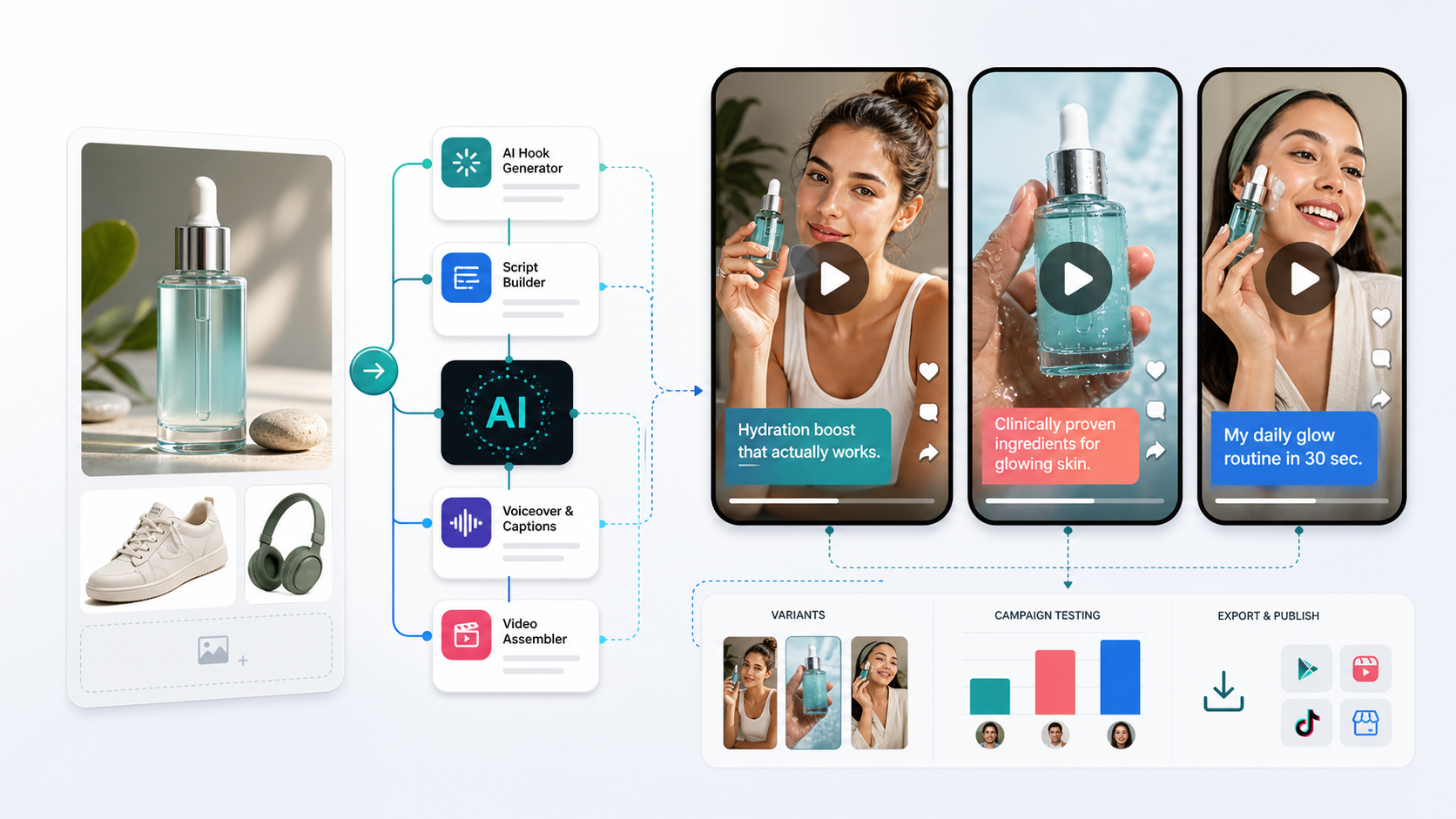
An AI video ad generator can turn an approved product image, a script and a visual direction into short creator-style ad concepts. The useful output is not “as many videos as possible.” It is a small batch of traceable variants that keep the product accurate, change one test idea at a time and pass a human review before launch.
This guide covers that production handoff. It is based on current Genflow workflow surfaces and official channel guidance, not a live media-buying experiment. We did not run a controlled campaign or measure conversion lift for this article. Generated clips are proposals until a reviewer approves the product depiction, claim, rights, disclosure and export.
The short workflow
Use this sequence when the source is a product image:
- Build a Product Truth Pack from approved assets and claims.
- Write a Variant Contract that says what may change and what must not.
- Draft three distinct hooks tied to one proof point.
- Generate the smallest useful set of scenes or clips.
- Review every attempt against the same acceptance gate.
- Export only approved variants and preserve the input-to-output record.
- Check the destination platform's current disclosure, rights and technical rules before launch.
Call the result an AI UGC-style ad when an AI presenter, voice or scene is involved. “UGC-style” describes the visual language; it does not turn a synthetic presenter into a customer or make a scripted statement a genuine testimonial.
AI video-ad generation is the broader task: it can include product demonstrations, motion graphics, cinematic product shots and creator-style formats. This guide narrows that task to UGC-style variants made from product images; the AI Video Ads and Campaign Creative page covers the broader workflow intent.
1. Start with a Product Truth Pack
A clean packshot is useful, but it is not a complete brief. Give the workflow a compact set of approved facts so visual generation cannot silently invent the product story.
Create one folder or project note containing:
- Master product image: the approved packshot or cutout, plus any angles needed to verify shape, label, color and scale.
- Exact product identity: name, variant, size, packaging version and market.
- Allowed claims: the precise wording a reviewer has approved, with a source or owner for each claim.
- Required proof: what must appear on screen to support the hook, such as texture, application, an actual feature or a clearly qualified demonstration.
- Prohibited changes: label edits, invented ingredients, altered accessories, impossible effects, fake review language or transformations that would misrepresent what ships.
- Rights record: ownership or permission for the product assets, music, voice, likeness, logo and any reference material.
- Channel contract: aspect ratio, duration range, caption needs, safe zones, file type, disclosure requirement and CTA destination.
Do not ask the model to infer missing product facts from the image. If a claim or ingredient is not in the approved pack, it is not available to the script.
2. Write a Variant Contract before generating
Teams often produce “five variants” that change the hook, presenter, scene, claim and CTA at once. Even if one performs better, the batch cannot tell you why. A Variant Contract keeps the comparison legible.
For each batch, define:
- Hypothesis: the single decision the variants should inform.
- Changed dimension: hook, proof shot, opening frame, presenter style or CTA—not all of them.
- Invariants: product image, approved claim, offer, target audience, duration, aspect ratio and review rules.
- Minimum proof: the frame or action that must make the message believable without inventing a result.
- Rejection rule: the specific defect that disqualifies an output before media testing.
Example: “For the same skincare product, audience and approved hydration claim, compare a problem hook, a demonstration hook and a routine hook. Keep the packshot, proof wording, 9:16 format and CTA unchanged. Reject any clip that alters the label, implies a medical outcome or presents an AI actor as a verified customer.”
This is a production-control example, not a recommendation for a particular product claim.
3. Turn one proof point into three hook cards
A hook should create a reason to keep watching while remaining attached to evidence. Write each option as a card rather than a loose prompt:
| Field | What to record |
|---|---|
| Hook | The exact opening line or visual beat |
| Audience tension | The real problem or job it addresses |
| Proof moment | What the viewer will see that supports the message |
| Product invariant | Label, shape, color or behavior that must remain true |
| Presenter status | Real creator, licensed avatar or synthetic presenter |
| CTA | The same next step used across the controlled batch |
For a creator-style clip, three useful directions are usually enough for a first batch:
- Problem hook: names the situation, then shows the product in its real use context.
- Demonstration hook: opens on the product action or texture and lets the proof carry the first seconds.
- Routine hook: shows where the product fits in a credible sequence without fabricating a personal result.
TikTok's current Creative Codes guidance uses a hook, body and close structure and recommends showing the product clearly. Its Creative Center also exposes authorized Top Ads and current creative examples. Use those surfaces to study the channel; do not copy another advertiser's script, shot order or claim.
4. Build the generation path around approval points
In Genflow, the AI UGC Video Generator provides creator-style starting structures, hook variants and a reusable workflow path. The broader AI Video Ads and Campaign Creative page is the task-level entry point. Those pages describe available workflow patterns; they do not prove that a generated ad is accurate, compliant or effective for your product.
Keep the path simple:
- Attach the Product Truth Pack and one hook card.
- Create or choose the opening image/scene while the product reference is visible to the reviewer.
- Generate the short motion or presenter segment needed for that card.
- Add captions and CTA only after the spoken and visual claim passes review.
- Duplicate the approved structure, then change only the dimension named in the Variant Contract.
If a defect appears, repair the smallest failing part. A label error is not a reason to rewrite the hook; weak proof is not fixed by changing the aspect ratio. Record the rejected attempt so the same failure is not promoted later by mistake.
5. Use a Product-to-Ad Acceptance Record
Copy this record for every requested output. It is a worksheet for project notes, not an automated Genflow score or a promise that the asset will pass a platform review.
Batch ID / owner / review date:
Product / variant / market / approved source version:
Asset rights owner / presenter or voice status / music source:
Approved claim / evidence owner / prohibited wording:
Channel / aspect ratio / duration / captions / CTA:

Variant ID / hypothesis / one changed dimension:
Hook card / proof moment / invariants:
Model or workflow setting shown at generation time:
Output ID / file version / generated-at time:

PRODUCT TRUTH
Label and packaging: pass / fail / not shown
Color, shape and scale: pass / fail / not shown
Use or demonstration: pass / fail / not shown

MESSAGE AND RIGHTS
Claim matches approved wording: pass / fail
Proof supports the claim: pass / fail
No fabricated testimonial or result: pass / fail
Likeness, voice, music and references cleared: pass / fail
Required AI/sponsorship disclosure prepared: pass / fail

DELIVERY
Lip sync, motion and continuity: pass / fail / not applicable
Captions, safe zones and CTA: pass / fail
File opens and matches channel contract: pass / fail

Decision: accept / repair / reject
Reason / smallest repair / reviewer:
Count an “accepted variant” only when the same final file passes product truth, message/rights and delivery review. Report failed attempts as attempts; do not hide them when comparing workflow cost or yield. If no output passes, record “zero accepted” rather than converting a draft into a success metric.
Worked example — hypothetical, not a campaign result
Suppose the approved source is a fictional fragrance-free hand cream. The Product Truth Pack allows the factual phrase “fragrance-free,” includes an approved packshot and label reference, and prohibits medical relief claims or customer-testimonial language. The batch keeps the product, audience, format and CTA fixed while changing only the opening hook:
- Problem hook: “Hands feel tight after repeated washing?” The generated script adds “heals cracked skin,” which is outside the approved claim. Reject the variant; do not repair it by hiding the line in captions.
- Demonstration hook: opens on a small amount of cream spread across the back of a hand, followed by the unchanged product packshot. The label, allowed wording, disclosure and export all pass. Accept the file for the controlled test.
- Routine hook: shows the product beside a sink, but motion blur makes the label unreadable. The claim remains within scope. Repair the product shot only, then rerun the same acceptance record.
This example shows the decision logic, not a real Genflow output, customer workflow or performance finding. A real product needs its own evidence, rights review and destination-platform check.
6. Check disclosure and commerce metadata at the destination
Disclosure is a publishing requirement, not a caption style to decide after rendering. TikTok Ads Manager documents a dedicated AI-generated content disclaimer. Requirements can vary by content, market and account, so check the current interface and policy when the ad is uploaded.
For product data sent to Google Merchant Center, Google's current AI-generated content guidance requires specified digital-source metadata for AI-generated images and structured fields for AI-generated title or description data. That guidance is specific to Merchant Center inputs; it does not replace the separate rules of an ad platform or local law.
Also review whether the creative could imply a real customer experience. A synthetic actor saying “this fixed my problem” is not made truthful by a small AI label. Use approved factual language, identify synthetic elements where required and send uncertain claims to the appropriate legal or platform-policy owner. For a detailed preflight, use the AI UGC ad disclosure review checklist.
7. Learn from results without breaking the test
Name files and campaign variants so the creative decision remains visible: batch-hook-proof-format-version. Keep the approved source version and acceptance record beside the exported file.
When campaign data is available, compare variants within the same objective, audience and measurement setup. A click-through difference does not prove that the generator, model or presenter caused the result if the offer, placement or spend also changed. Use the finding to choose the next controlled batch, not to publish a universal claim about what “converts.”
The same discipline applies before launch. If one variant is rejected for product accuracy, its generation speed is irrelevant. If all three pass but the proof moment is unclear, revise the shared proof before multiplying the batch.
Put the method into a reusable Genflow workflow
Start with one approved Product Truth Pack and one Variant Contract, then open Genflow Studio or a relevant workflow template. Keep the hook card, product reference and acceptance rule attached to the production path so another operator can replace the SKU without losing the constraints.
Generation may require an account and credits, and available models or settings can change. Check the workspace before confirming a run. The production goal is not a synthetic creator who looks convincing in isolation; it is an approved ad variant whose product, message and handoff can be explained.
Turn this method into a reusable workflow
Start from one product asset, ad concept, or template and save repeatable production steps as a Genflow workflow.